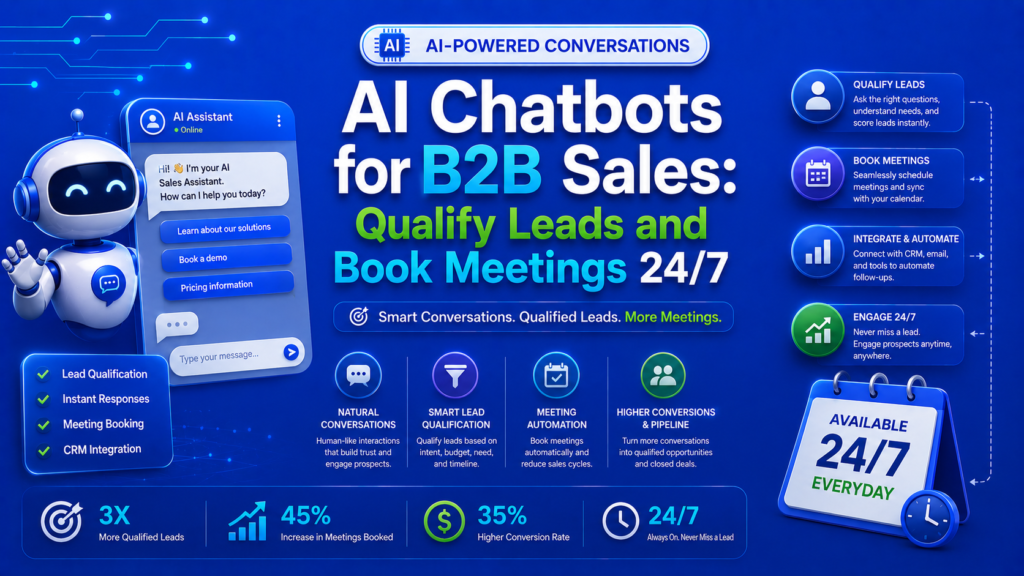
AI chatbots for B2B sales qualify website visitors using conversational AI by: (1) greeting visitors with contextual messages based on the page they’re viewing, (2) asking 3-5 qualifying questions (company size, role, challenge, timeline, budget range), (3) routing qualified leads to sales reps via real-time alerts, (4) booking meetings directly through calendar integration, and (5) capturing lead data in your CRM automatically.
Your best leads visit your website at 10 PM on a Tuesday. They browse your pricing page, read a case study, check your “About” page and then leave. By the time your sales team follows up the next morning, they have already started a demo with your competitor who had a chatbot ready to engage them.
AI chatbots are not a support tool. For B2B companies, they are a 24/7 sales qualification and meeting-booking machine.
This guide covers everything you need to implement an AI chatbot that generates real pipeline not a novelty that annoys visitors.
Why AI Chatbots Work for B2B Sales
The B2B buying journey has a fundamental timing problem:
- 68% of B2B buyers prefer to research independently before talking to sales
- 78% of B2B deals go to the vendor that responds first
- The average response time to a B2B web lead is 42 hours
AI chatbots solve the timing problem by engaging qualified visitors instantly, regardless of time zone or business hours.
The ROI Case
|
Metric |
Without Chatbot |
With AI Chatbot |
|
Average lead response time |
42 hours |
< 30 seconds |
|
After-hours lead capture |
0% |
100% |
|
Website visitor to lead conversion |
2-3% |
5-10% |
|
Qualified meeting bookings/ month |
Manual only |
15-40 additional |
|
Sales team time on qualification |
10+ hours/week |
2-3 hours/week |
The B2B Chatbot Architecture
Conversation Flow Design
Stage 1: Contextual greeting (0-10 seconds)
- On pricing page: “Exploring our pricing? I can help you find the right plan for your team size and needs.”
- On case study page: “Interested in how we helped [company]? I can share more results specific to your industry.”
- On blog post: “Great article, right? Want me to send you the companion checklist?”
- Return visitor: “Welcome back! Last time you were looking at [product/feature]. Anything I can help with today?”
Stage 2: Qualifying questions (1-3 minutes)
- Role qualifier: “What is your role? I want to make sure I share the most relevant information.”
- Company qualifier: “What company are you with? This helps me tailor our conversation.”
- Challenge qualifier: “What is the biggest marketing challenge you are trying to solve right now?”
- Timeline qualifier: “When are you looking to implement a solution?”
- Budget qualifier (optional): “Do you have a budget allocated for this initiative?”
resources” is better than “Please answer these qualifying questions.”
Stage 3: Routing decision
- Qualified + high intent: Route to live sales rep immediately (with real-time notification). If no rep available, offer to book a meeting.
- Qualified + low intent: Offer a valuable resource (whitepaper, webinar) and add to nurture sequence.
- Not qualified: Provide helpful self-serve resources and general information.
Stage 4: Meeting booking
- Integrate with Calendly, HubSpot Meetings, or Google Calendar
- Show available time slots within the chat interface
- Send automatic confirmation emails with meeting details
- Create CRM records and notify the assigned sales rep
AI Capabilities That Matter
Natural language understanding. The chatbot understands free-text responses, not just button selections. A visitor can type “I’m the VP of Marketing at a SaaS company struggling with lead gen” and the chatbot extracts role, industry, and challenge.
industry expertise, and current workload.
Answer synthesis. AI chatbots trained on your knowledge base (website content, FAQs, product documentation) answer product questions accurately without human intervention.
Chatbot Platform Recommendations
For SMB B2B Companies ($100-$500/month)
HubSpot ecosystem.
For Mid-Market and Enterprise ($500-$5,000/month)
6sense Conversational Email + Chat — Combines intent data with chatbot engagement. Prioritizes conversations with in-market accounts.
Implementation Guide
Week 1: Setup and Configuration
- Choose your chatbot platform based on your CRM and tech stack
- Define qualifying criteria: what makes a visitor “qualified” for your business?
- Map out conversation flows for your top 5 high-traffic pages
- Write chatbot messages (use AI to generate variations, then edit for brand voice)
- Integrate with CRM, calendar, and email tools
Week 2: Content and Training
- Train the chatbot on your knowledge base (upload FAQs, product docs, pricing info)
- Create response templates for common questions
- Set up routing rules: which leads go to which reps?
- Configure notification settings for real-time alerts
- Set up reporting dashboards
Week 3: Testing and Soft Launch
- Internal testing: have your team interact with the chatbot as if they were prospects
- Fix conversation flow issues and incorrect answers
- Soft launch on 1-2 pages with lower traffic
- Monitor all conversations and refine responses
- Gather feedback from sales team on lead quality
Week 4: Full Launch and Optimization
- Roll out chatbot across all key pages
- A/B test greeting messages and conversation flows
- Review conversation transcripts daily (first month)
- Optimize qualifying questions based on conversion data
- Refine routing rules based on sales feedback
Measuring Chatbot ROI
Core Metrics
|
Metric |
Benchmark |
Excellent |
|
Engagement rate (visitors who interact) |
2-5% |
8%+ |
|
Qualification rate |
15-25% of engaged |
30%+ |
|
Meeting booking rate |
5-10% of qualified |
15%+ |
|
Chatbot-sourced pipeline/month |
$50K+ |
$200K+ |
|
Average response quality score |
3.5/5 |
4.5/5 |
Attribution Setup
- Tag chatbot-sourced leads in your CRM with source = “chatbot”
- Track chatbot-assisted conversions (visitor engaged with chatbot before filling out a form)
- Measure time-to-meeting for chatbot leads vs. form leads
- Compare chatbot lead quality (SQL rate) against other lead sources
Common Mistakes to Avoid
blog posts, trigger later or use a passive “Ask me anything” widget.
The Bottom Line